


17-01-2024, 05:30 PM
Thanks to strepto for making this disk image available. A standard Microbee DS80 3.5" disk thats bootable and with no copy protection. The manual is A4 in size and 23 pages long. Both written by Mark Cocquio from Superior Software in the mid to late 1980's.
If you're into graphics on the Microbee, then this is it. From the Manual -
Dexign allows the user to:
* Create their own fonts.
* Create their own screens (with graphics or without).
* Colour these screens, with foreground and background colour.
* Create screens in a variety of modes: normal (16 line), 32-line, 80*24 mode and also Hires II.
* Pixels can be edited onscreen, and large sprites can be created with a minimum of fuss.
* A colour table can be embedded into the screen; ie, you can define the colour that you want
each character to appear and it will be coloured automatically.
* For systems without arrow keys, (nearly) any keys can be used for movement.
This manual is designed to introduce each of Dexign's functions in a clear and straightforward
manner (however, it may not!), or at least help you discover what things do. Many functions
are self explanatory, but they are included here for completeness.
The program boots to -
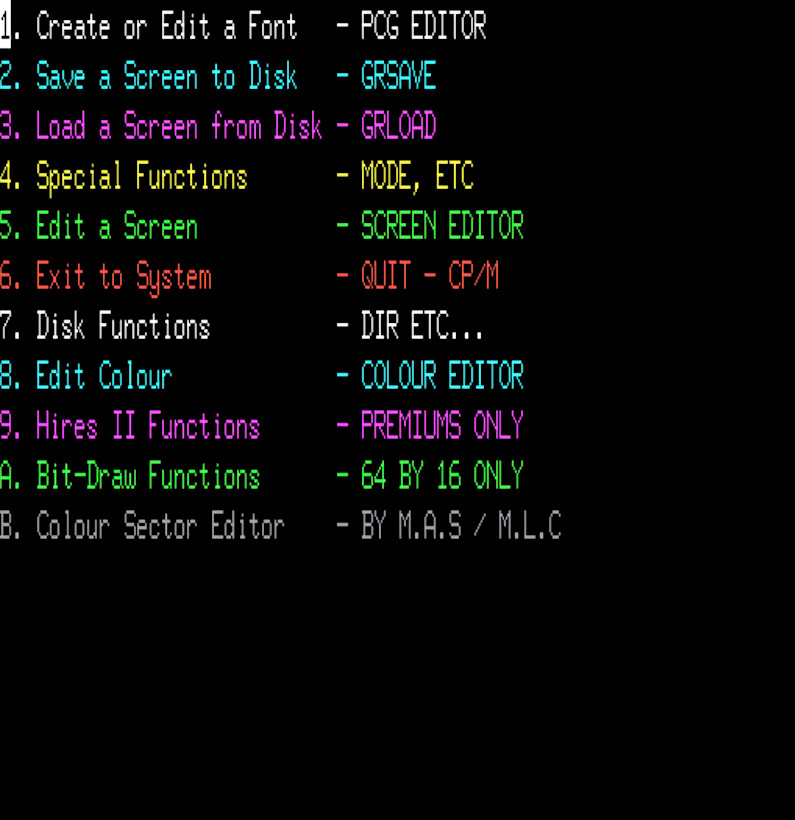
The disk contains an extensive Manual (dexign.ws) in Wordstar format. Its also been extracted and converted to a PDF for easier use. The disk boots and program runs fine on a 128k and Premium 128k Microbee. If you change the disks boot track for the 256TC, it works on that also. The SHELL.SYS has been extensively altered also.
So in the MbeeTech Repository in the Microbee\Applications\Graphics folder we placed
dexign_ds80.dsk
dexign_manual.pdf <--- in the Documentation\Software folder
If you're into graphics on the Microbee, then this is it. From the Manual -
Dexign allows the user to:
* Create their own fonts.
* Create their own screens (with graphics or without).
* Colour these screens, with foreground and background colour.
* Create screens in a variety of modes: normal (16 line), 32-line, 80*24 mode and also Hires II.
* Pixels can be edited onscreen, and large sprites can be created with a minimum of fuss.
* A colour table can be embedded into the screen; ie, you can define the colour that you want
each character to appear and it will be coloured automatically.
* For systems without arrow keys, (nearly) any keys can be used for movement.
This manual is designed to introduce each of Dexign's functions in a clear and straightforward
manner (however, it may not!), or at least help you discover what things do. Many functions
are self explanatory, but they are included here for completeness.
The program boots to -
The disk contains an extensive Manual (dexign.ws) in Wordstar format. Its also been extracted and converted to a PDF for easier use. The disk boots and program runs fine on a 128k and Premium 128k Microbee. If you change the disks boot track for the 256TC, it works on that also. The SHELL.SYS has been extensively altered also.
So in the MbeeTech Repository in the Microbee\Applications\Graphics folder we placed
dexign_ds80.dsk
dexign_manual.pdf <--- in the Documentation\Software folder
---------------------------
ChickenMan
ChickenMan